The Octave Queueing Package
News
- 2020/03/21
queueing-1.2.7has been released. This is a bug fix release; see the ChangeLog for details.- 2018/10/06
queueing-1.2.6has been released.- 2016/12/14
queueing-1.2.5has been released.- 2016/09/01
queueing-1.2.4has been released.- 2014/03/12
queueing-1.2.3has been released.- 2013/06/29
queueing-1.2.2has been released.- 2013/02/05
queueing-1.2.1has been released.- 2012/11/05
queueing-1.2.0has been released.- 2012/09/08
queueing-1.1.1has been released.- 2012/04/06
queueing-1.1.0has been released.
About
The queueing package is a software package for
queueing networks and Markov chains analysis written in GNU Octave. The package
currently includes the following algorithms:
- Exact asymptotic analysis of single or multi-class, product-form open Queueing Networks (Jackson networks or BCMP networks).
- Mean Value Analysis (MVA) for single or multi-class closed networks. Class switching is supported for multiclass closed networks.
- MVA for multiclass, mixed (open/closed) networks.
- Approximate MVA for closed, multi-class QN, using Bard-Schweitzer approximation.
- Convolution algorithm for closed, single-class product-form networks.
- MVABLO for closed, single-class QN with blocking.
- Various bounding techniques (asymptotic, balanced system and geometric bounds, among others).
- Transient and steady-state analysis of continuous and discrete-time Markov chains (e.g., computation of sojourn times, expected time to absorption, mean passage times, time-averaged sojourn times...).
- Steady-state analysis of the single-station queueing systems (M/M/1, M/M/m, M/M/∞, M/M/1/K and M/M/m/K finite-capacity systems, Asymmetric M/M/m, M/G/1, H/Hm/1).
The queueing package requires some knowledge of
queueing theory; furthermore, it (currently) does not include a GUI
for interactively draw queueing networks. See the additional Resources below for a (non
comprehensive) list of software packages for queueing networks
analysis.
The queueing package is under active
development. New versions are released frequently.
queueing is released WITHOUT ANY WARRANTY, see the file
COPYING for details.
I developed the queueing package to support my own
research, and I am releasing it in the hope it can be useful to
others. If you use the queueing package for teaching or
research purposes, I would like to hear about your experience with
it.
Download
Latest stable release
- The latest stable release is queueing-1.2.7 and can be downloaded from the package page at Octave-Forge
Development version
- You can browse the source tree of the latest development version on SourceForge. You can also check out a read-only copy of the
queueingpackage source files using Mercurial:
hg clone http://hg.code.sf.net/p/octave/queueing octave-queueing
Old versions
- queueing-1.2.6.tar.gz
- queueing-1.2.5.tar.gz
- queueing-1.2.4.tar.gz
- queueing-1.2.3.tar.gz
- queueing-1.2.2.tar.gz
- queueing-1.2.1.tar.gz
- queueing-1.2.0.tar.gz
- queueing-1.1.1.tar.gz
- queueing-1.0.0.tar.gz
- qnetworks-0.8.11.tar.gz
- qnetworks-0.8.10.tar.gz
- qnetworks-0.8.9.tar.gz
Note that there is no binary distribution, as
queueing is entirely implemented as Octave scripts;
therefore, queueing should run on any system where GNU
Octave has been ported.

queueing is released under the GNU General Public
License, version 3 or later. See the file COPYING for details; this file is also included in
the software distribution.
Documentation
The user manual is available in the following formats:
If you use this package in some published work, please cite it as follows:
- Moreno Marzolla, Queueing Networks and Markov Chains Analysis with the Octave Queueing Package, Performance Evaluation Review, vol 49, n. 4, pp. 47—52, March 2022, ISSN 0163-5999, doi> Video presentation © the author
Other publications:
- Moreno Marzolla, The Octave Queueing Package, proc. 11th International Conference on Quantitative Evaluation of SysTems (QEST 2014), September 8—10, 2014, Florence, Italy, Gethin Norman and William Sanders (Eds.), volume 8657 of LNCS, pp. 174—177, ISBN 978-3-319-10695-3 (print), 978-3-319-10696-0 (online), doi>
- Moreno Marzolla, Queueing Networks Analysis with the qnetworks Toolbox, Technical Report UBLCS-2012-02, Department of Computer Science, University of Bologna, Italy, February 2012
- Moreno Marzolla, The qnetworks Toolbox: A Software Package for Queueing Networks Analysis. Khalid Al-Begain, Dieter Fiems and William J. Knottenbelt, Editors, Proceedings Analytical and Stochastic Modeling Techniques and Applications, 17th International Conference (ASMTA 2010), Cardiff, UK, June 14—16, 2010, volume 6148 of Lecture Notes in Computer Science, Springer, pp. 102-116, ISBN 978-3-642-13567-5 doi> BibTeX
-
Moreno Marzolla, The
qnetworksToolbox: A Software Package for Queueing Networks Analysis, Technical Report UBLCS-2010-04, Department of Computer Science, University of Bologna, Italy, February 2010
Installation
- If you have a recent version of GNU Octave and a network connection,
you can install the
queueingpackage directly from the Octave prompt:If you get an error saying that you don't have write access to the installation directory, try the -local flag (which will install the queueing package locally in your home directory):pkg install -forge queueing
pkg install -forge -local queueing
- The package is not automatically loaded on startup. To use it you
first need to load queueing with the following Octave command:
The command above can be put in the startup file (
pkg load queueing
.octavercon Linux) to automatically loadqueueingwhen Octave starts. - If the
-forgeoption is not recognized, you need to manually download the installation tarball from the Octave-Forge page and type the following at the Octave prompt:Again, you need to load the package with:pkg install queueing-1.2.7.tar.gz
pkg load queueing
- Alternatively, you can unpack the installation tarball and copy all
.mfiles from theinst/directory to a location where Octave can find them. You can start Octave with the-p pathoption to tell it to add path to its search path, so that it will find the functions automatically without the need to move them:octave -p /path/to/queueing/inst
Refer to the documentation for the
list of functions provided by queueing.
The documentation for each function can be accessed from the Octave
prompt with the help command. For example, you can get the
documentation for function qncsmva with the command:
help qncsmva
Also, most of the functions have inline tests and demos. Tests are
used to check the correctness of the results, while demos provide
snippets of code which demonstrates how the function can be used.
For example, to show and execute the demos for qncsmva,
type the following command:
demo qncsmva
Usage examples
In this section we give some basic usage example for
queueing. Refer to the documentation for more examples.
Suppose that we want to analyze the following closed network:
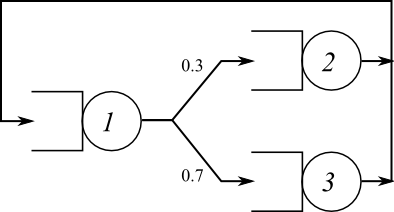
Fig. 1: Three-nodes central server queueing network model (closed network)
The routing probabilities are shown in the picture. To analyze this
network we use the qnclosed() function. This function has
the following signature:
[U, R, Q, X] = qnclosed (N, S, V, ...)
where N is the number of requests in the (closed)
network, S and V are arrays such that
S(k) is the service time at center k, and
V(k) is the visit count at center
k. The visit counts V for a closed network
satisfy the equality V*P == V with the additional
constraint V(1) == 1. V can be computed from
the routing probability matrix P using the
qncsvisits function, as follows:
P = [0 0.3 0.7; 1 0 0; 1 0 0];
V = qncsvisits(P)
V =

   1.00000   0.30000   0.70000
By default, qncsvisits uses station 1 as the reference
station; the reference station is used for two purposes: its
throughput is considered the system throughput, and a job returning to
the reference station is assumed to have completed one interaction
with the system. It is possible to specify a different reference
station, use the command help qncsvisits for details.
Let us suppose that there are N=10 requests in the
system. We let the average service times be S = [1 2 0.8].
We analyze the network as follows:
N = 10;
S = [1 2 0.8];
P = [0 0.3 0.7; 1 0 0; 1 0 0];
V = qncsvisits(P);
[U R Q X] = qnclosed( N, S, V )
U =

   0.99139   0.59483   0.55518

R =

   7.4360   4.7531   1.7500

Q =

   7.3719   1.4136   1.2144

X =

   0.99139   0.29742   0.69397
where U is the vector of per-node utilizations,
R is the vector of per-node response times,
Q is the vector of average queue lengths and
X is the vector of throughputs. Thus, the utilization of
service center 1 is U(1)==0.99139, which is very close to
1.0. We can conclude that the service center 1 is the bottleneck
device.
Analyzing open networks is very similar. Consider the open network shown in Fig. 2
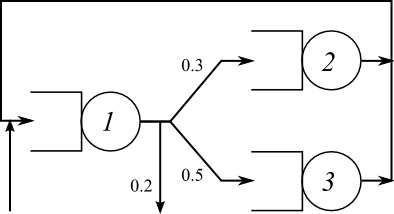
Fig. 2: Three-nodes Central Server Queueing Network Model (Open network)
Assume that the average service times are as in the previous
example (S = [1 2 0.8]). Furthermore, assume an external
arrival rate of 0.3 requests/s to center 1, and no external arrivals
to other centers.
Again, we need first to compute the visit counts. The function
qnosvisits can be used to compute the visit counts for
open networks; the function accepts the routing probability matrix
P as the first parameter, and the vector of external
arrival rates as the second. The vector of external arrival rates is
lambda = [0.3 0 0]. Thus, we can issue the following
Octave commands:
P = [0 0.3 0.5; 1 0 0; 1 0 0];
lambda = [0.15 0 0];
V = qnosvisits(P,lambda)
V =

   5.0000   1.5000   2.5000
We might also verify that the external arrival rate is less than the processing capacity of the network, which by definition is the inverse of the maximum service demand:
S = [1 2 0.8];
D = V .* S
D =

   5.0000   3.0000   2.0000
1/max(D)
ans = 0.20000
sum(lambda)
ans = 0.15000
Since sum(lambda) < 1/max(D), it is possible to
analyze the steady-state behavior of the network. We use the
qnopen function to compute the results of interest:
[U R Q X] = qnopen( sum(lambda), S, V )
U =

   0.75000   0.45000   0.30000

R =

   4.0000   3.6364   1.1429

Q =

   3.00000   0.81818   0.42857

X =

   0.75000   0.22500   0.37500
Finally, we consider a more complete example. The following is
embedded as a demo function of the qnclosed.m
source file, and you can execute it by issuing this command at the
Octave prompt:
demo qnclosed
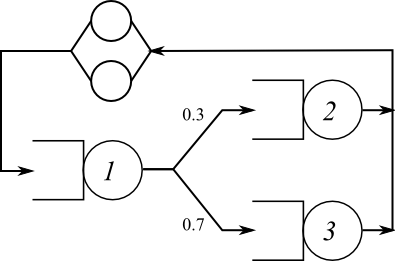
Fig. 3: Three-nodes Central Server Queueing Model (Closed network), with terminals
In this demo we want to compute the bounds on the system throughput
for the network in Fig. 3, which
is very similar to the one of Fig. 1, with the only addition of an external
think time. We are going to use the qnclosedab
and qnclosedbsb functions, to compute the bounds on the
system throughput for increasing values of the population size N, and
compare the results with the exact throughput provided by the MVA algorithm.
P = [0 0.3 0.7; 1 0 0; 1 0 0]; # Transition probability matrix
S = [1 0.6 0.2];               # Average service times
m = ones(size(S));             # All centers are single-server
Z = 2;                         # External delay
N = 15;                        # Maximum population to consider
V = qncsvisits(P); # Compute number of visits from P
X_bsb_lower = X_bsb_upper = X_ab_lower = X_ab_upper = X_mva = zeros(1,N);
for n=1:N
  [X_bsb_lower(n) X_bsb_upper(n)] = qncsbsb(n, S, V, m, Z);
  [X_ab_lower(n) X_ab_upper(n)] = qncsaba(n, S, V, m, Z);
  [U R Q X] = qnclosed( n, S, V, m, Z );
  X_mva(n) = X(1)/V(1);
endfor
close all;
plot(1:N, X_ab_lower,"g;Asymptotic Bounds;", \
     1:N, X_bsb_lower,"k;Balanced System Bounds;", \
     1:N, X_mva,"b;MVA;", "linewidth", 2, \
     1:N, X_bsb_upper,"k", 1:N, X_ab_upper,"g" );
axis([1,N,0,1]); legend("location","southeast");
xlabel("Number of Requests n"); ylabel("System Throughput X(n)");
The result is shown in Fig. 4.
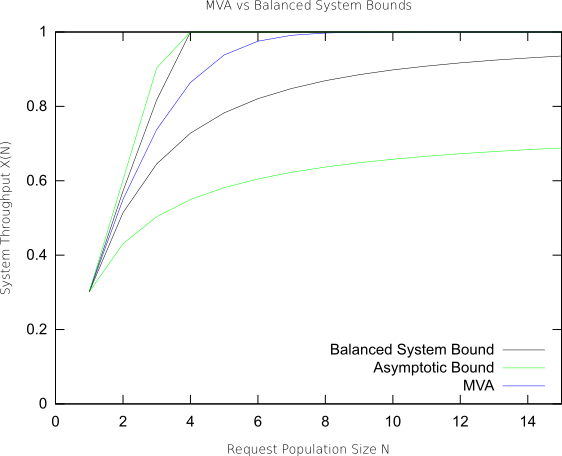
Fig. 4: Balanced System Bounds and Asymptotic Bounds on the system throughput X(N) as a function of the population size N for the three-node, closed network in Fig. 3.
Finally, starting from version 0.8.0 of queueing,
there are a couple of functions which facilitate the definition and
analysis of QN models. These functions are qnmknode and
qnsolve. The first one is used to create appropriate data
structures describing certain kind of QN nodes; the second one is used
to analyze a model represented by those data structures. It should be
observed that qnsolve (re)implements the same algorithms
used by other functions such as qnopensingle,
qnclosedsingle and so on; only the input parameters are
different.
Consider again the closed network shown in Fig. 3. Using the new functions, the network can be described and analyzed as follows:
P = [0 0.3 0.7; 1 0 0; 1 0 0];
V = qncsvisits(P);
QQ = { qnmknode("m/m/m-fcfs", 1), ...
       qnmknode("m/m/m-fcfs", 0.6), ...
       qnmknode("m/m/m-fcfs", 0.2) };
Z = 2; # external delay
N = 10; # population
[U R Q X] = qnsolve("closed", N, QQ, V, Z);
The qnmknode function can be used to instantiate
different kind of nodes (see the documentation for details). If can
also be used to create multi-class nodes, or general load-dependent
nodes, which can be analyzed with qnsolve. Again, see the
documentation for details.
TODO
The software can be improved in many ways:
- Keep the documentation up-to-date; add missing chapters.
- Improve test coverage.
- Implement additional QN algorithms. Some references are G. Bolch, S. Greiner, H. de Meer, K. Trivedi, Queueing Networks and Markov Chains—Modeling and Performance Evaluation with Computer Science Applications, Wiley, 1998; L. Kleinrock, Queueing Systems Volume 1: Theory, Wiley-Interscience; 1 edition (January 2, 1975), ISBN 978-0471491101.
Additional Resources
Other Queueing Packages
- Java Modelling Tools (JMT), developed by the Performance Evaluation Lab of the Politecnico di Milano, Italy. This software is very powerful and includes an easy to use GUI; being written in Java, it runs on many platforms. Furthermore, it can handle general (i.e., non product form) networks through simulation.
- PDQ—Pretty Damn Quick supports analytical solution of QN models using conventional programming languages
- List of Queueing Theory Software, maintained by Myron Hlynka
References
- Ian F. Akyildiz, Mean Value Analysis for Blocking Queueing Networks, IEEE Transactions on Software Engineering, vol. 14, n. 2, April 1988, pp. 418—428.
- Y. Bard, Some Extensions to Multiclass Queueing Network Analysis, proc. 4th Int. Symp. on Modelling and Performance Evaluation of Computer Systems, feb. 1979, pp. 51—62
- Forest Baskett, K. Mani Chandy, Richard R. Muntz, and Fernando G. Palacios. 1975. Open, Closed, and Mixed Networks of Queues with Different Classes of Customers. J. ACM 22, 2 (April 1975), 248—260.
- G. Bolch, S. Greiner, H. de Meer and K. Trivedi, Queueing Networks and Markov Chains: Modeling and Performance Evaluation with Computer Science Applications, Wiley, 1998
- Jeffrey P. Buzen, Computational algorithms for closed queueing networks with exponential servers. Commun. ACM 16, 9 (September 1973), 527-531.
- G. Casale, R. R. Muntz, G. Serazzi. Geometric Bounds: a Noniterative Analysis Technique for Closed Queueing Networks, IEEE Transactions on Computers, 57(6):780—794, Jun 2008. doi>
- G. Casale. A Note on Stable Flow-Equivalent Aggregation in Closed Networks, Queueing Systems, 60(3):193-202, Springer, Dec 2008. [SpringerLink]
- C. H. Hsieh and S. Lam, Two classes of performance bounds for closed queueing networks, PEVA, vol. 7, no. 1, pp. 3—30, 1987.
- James R. Jackson, Jobshop-Like Queueing Systems, Vol. 50, No. 12, Ten Most Influential Titles of "Management Science's" First Fifty Years (Dec., 2004), pp. 1796-1802
- Edward D. Lazowska, John Zahorjan, G. Scott Graham, and Kenneth C. Sevcik, Quantitative System Performance: Computer System Analysis Using Queueing Network Models, Prentice Hall, 1984
- M. Reiser and S. S. Lavenberg, Mean-Value Analysis of Closed Multichain Queuing Networks, Journal of the ACM, vol. 27, n. 2, April 1980, pp. 313—322.
- M. Reiser, H. Kobayashi, On The Convolution Algorithm for Separable Queueing Networks, In Proceedings of the 1976 ACM SIGMETRICS Conference on Computer Performance Modeling Measurement and Evaluation (Cambridge, Massachusetts, United States, March 29—31, 1976). SIGMETRICS '76. ACM, New York, NY, pp. 109—117.
- P. Schweitzer, Approximate Analysis of Multiclass Closed Networks of Queues, Proc. Int. Conf. on Stochastic Control and Optimization, jun 1979, pp. 25—29.
- Herb Schwetman, Implementing the Mean Value Algorithm for the Solution of Queueing Network Models, Technical Report CSD-TR-355, Department of Computer Sciences, Purdue University, 1982.
- Herb Schwetman, Some Computational Aspects of Queueing Network Models, Technical Report CSD-TR-354, Department of Computer Sciences, Purdue University, 1981 (revised).
- Zahorjan, J. and Wong, E. The solution of separable queueing network models using mean value analysis. SIGMETRICS Perform. Eval. Rev. 10, 3 (Sep. 1981), 80—85.


